How to save a Verizon voicemail
On an iPhone, Verizon's page says: open the Phone app, tap the menu, then Voicemails, tap the message, tap Share and choose Save to Files or New Quick Note. On a Samsung, open the Voicemail app, tap the message and tap Archive twice; it's saved to the phone's internal storage. Basic voicemail has no download; Verizon points to a paid outside service that makes permanent copies.
On this page (6)
Verizon has several kinds of voicemail, and each one saves differently. Visual voicemail on a smartphone lets you take the file out; basic voicemail, the kind you call into, doesn’t. Here’s what Verizon’s own pages say for each, read on November 23, 2026 (Verizon’s pages show no updated date).
How do you save a Verizon voicemail on an iPhone?
From Verizon’s iPhone voicemail page:
- “Open the Phone app.”
- “Tap the 3-line Menu then tap Voicemails.” (In Apple’s iOS 26 Unified layout the same list is under Calls › Filter › Voicemails; see saving a voicemail on iPhone.)
- “Tap the desired message.”
- “To save or share a message: Tap the Share icon. Select New Quick Note or Save to Files then follow the prompts.”
Save to Files gives you an audio file you can open in the tool below.
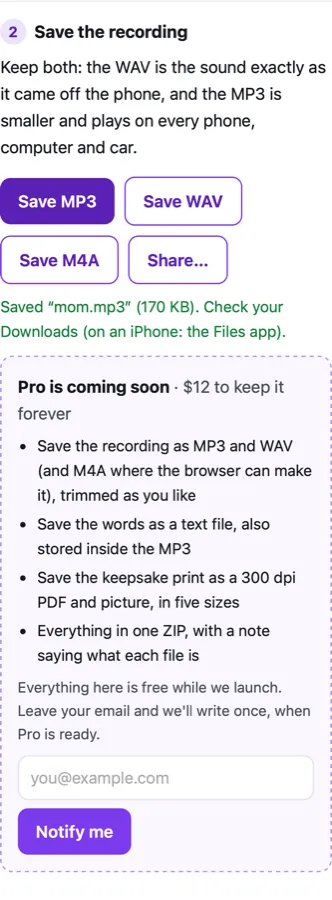
After opening a saved voicemail (here a made-up test file), Save MP3 and Save WAV make the copies to keep. (A chart on Verizon’s voicemail comparison page marks “Save Voicemails to Device” as unavailable for iPhone Visual Voicemail, which seems to contradict the steps above; the steps are Apple’s standard Share button.)
How do you save one on a Samsung or other Android phone?
From Verizon’s Samsung page:
- “Open the Voicemail app.”
- “Tap the message you want to save (the name icon changes to a checkmark).”
- “Tap Archive then tap Archive to confirm.” Verizon says “archived messages are saved to the device’s internal storage.”
To send it instead, tap Forward or Share via and choose Message or Email. For other Android phones, Verizon’s visual voicemail FAQ says only: “On Android phones, how you save voicemails varies by device.” The Android guide covers Google’s Phone app.
Keep the Verizon voicemail you saved
Choose the voicemail you want to keep
M4A, AMR, 3GP, MP3 or WAV, from any phone. Or drop it here.
No file yet? or read how to get the file off your phone.
1 Listen and trim
2 Save the recording
Keep both: the WAV is the sound exactly as it came off the phone, and the MP3 is smaller and plays on every phone, computer and car.
Saving the files is part of Pro. Your voicemail stays open here as you left it, and unlocks as soon as you've paid.
Pro is coming soon · $12 to keep it forever
- Save the recording as MP3 and WAV (and M4A where the browser can make it), trimmed as you like
- Save the words as a text file, also stored inside the MP3
- Save the keepsake print as a 300 dpi PDF and picture, in five sizes
- Everything in one ZIP, with a note saying what each file is
Everything here is free while we launch. Leave your email and we'll write once, when Pro is ready.
3 The words (optional)
A small speech model writes out what was said, on this device, in English. It downloads about 30 MB the first time (Wi-Fi is best) and is quickest on a computer or a recent phone. It gets some words wrong: read along while you listen. Or type the words yourself.
4 The keepsake print
That's more words than fit on this size, so the print ends with “…”. Shorten them, or pick a bigger size.
Add a QR code that plays the recording
We don't keep your recording anywhere, so the code needs a link to a copy you put online: save the MP3, upload it to your Google Drive, iCloud Drive or Dropbox, share it as "anyone with the link", and paste that link here. Then scan the preview with your phone before you print. How to make the link.
That doesn't look like a web link. It should start with https://
300 dpi, the exact size you picked: print it at home on card stock, or take the picture to a photo counter.
The MP3, the WAV, the words and the print together, with a note saying what each file is. Keep a copy in two places.
Runs in your browser. The recording never leaves your device. No sign-up.
What are Verizon’s voicemail limits?
From Verizon’s comparison chart and basic voicemail FAQ:
| Verizon voicemail | Messages it stores |
|---|---|
| Basic Voicemail | 20 (each up to 3 minutes) |
| Android Visual Voicemail | 20 |
| iPhone Visual Voicemail | 40 |
| Voicemail to Text for iPhone | 40 |
| Premium Visual Voicemail | 40 |
With a cap of 20 or 40, old messages tend to get deleted to make room; save the ones that matter as files first. The FAQ also says Verizon “is not liable for missed messages, or deletions of messages from your voice mailbox, even if you saved them.” We didn’t find a number of days on the pages we read.
What about basic voicemail?
Basic voicemail is the mailbox you dial into. On getting to basic voicemail online, Verizon’s FAQ says “No, we don’t currently offer this option,” and adds that forwarding “only works with other Verizon mobile voicemail subscribers in your own area.” It does name one way to get a file:
“permanent copies of your voicemail messages can be made through CBW Productions, Inc. for a minimal fee.”
Verizon adds that “This isn’t a Verizon wireless service,” that copies come as an MP3 by email, a CD or a USB flash drive, and that the message “MUST still be present in your voice mailbox.” We haven’t used the service and can’t speak to its price or speed. The free alternative is to record the message on speaker with a second phone.
What if the line belonged to someone who has died?
Verizon’s deceased account handling page says: “Before disconnecting a line, you can save any voicemails from that line. Contact us to learn more.” The phone number on that page is 800-922-0204. The same page lists keeping the line as it is (“No action is needed. You continue to be billed for the line”), which keeps the mailbox while you save what you need. Our guide to saving a voicemail after a death has the order to do things in.
Does Verizon transcribe voicemail?
Two paid options, per the visual voicemail FAQ: Premium Visual Voicemail lets you read voicemails “for $2.99/line per month on Android/Windows phones,” and Voicemail to Text for iPhone is also “$2.99/ line per month”; both “transcribe the first 45 seconds of your voicemails.” The tool on this page writes out the whole message on your device instead; see voicemail to text.
Questions people ask
How many voicemails does Verizon keep?
Verizon's comparison chart lists 20 messages for basic voicemail and Android Visual Voicemail, and 40 for iPhone Visual Voicemail, Voicemail to Text for iPhone and Premium Visual Voicemail. Basic voicemail also caps each message at 3 minutes.
Can I download Verizon basic voicemail?
Not from Verizon: its FAQ says online access isn't offered. It names CBW Productions, Inc., an outside company, which makes permanent copies for a fee (MP3 by email, CD or USB); the message must still be in the mailbox. Or record it on speaker with a second phone.
How do I save voicemails from a deceased person's Verizon line?
Verizon's deceased-account page says you can save voicemails from a line before disconnecting it, and to contact Verizon (800-922-0204) to learn more. It also says you can keep the line as it is. Save the files before anything is disconnected.
Does Verizon delete voicemails I've saved?
Verizon's FAQ says it is 'not liable for missed messages, or deletions of messages from your voice mailbox, even if you saved them.' Its pages we read don't state a number of days, so don't treat the mailbox as storage; save a file.
Is VoicemailKeepsake free?
Yes, while we launch: opening a Verizon voicemail file, trimming it and saving MP3 and WAV copies cost nothing and need no sign-up. Later, saving the files will be part of Pro, $12 once.
Related
- AT&T voicemailAT&T keeps basic voicemail 14 days and visual voicemail 30. How to save AT&T voicemails as files on iPhone and Samsung, and where archived ones go.
- T-Mobile voicemailSave T-Mobile voicemails as files from the Visual Voicemail app, DIGITS or an iPhone, and why canceling or transferring a line permanently deletes them.
- When someone has diedKeep a loved one's voicemail before it's lost: what to do before the phone line is canceled, how to save it as a file, and how to keep it for good.
- All guidesEvery VoicemailKeepsake guide, by task.