How to make a QR code that plays a voicemail
A QR code only holds a link, so first put the voicemail somewhere online: save it as an MP3, upload it to Google Drive, iCloud Drive or Dropbox, and share it so anyone with the link can open it. Copy that link, paste it into the QR box of the keepsake print here, and scan the preview with your phone before printing. The code works for as long as the file stays where it is and stays shared.
On this page (6)
The QR code on a sound wave print is the bridge between the paper and the voice: someone scans it and hears the message. It’s simple, but it depends on one thing that lasts longer than the paper should: a link to the recording.
How does a voicemail QR code work?
A QR code is a picture of a short piece of text, here a web address. When a phone camera reads it, the phone offers to open the address. So the steps are always the same: put the recording somewhere that has a web address, share it so anyone with the address can open it, and turn the address into a code. The keepsake print does the last step for you and draws the code at least 0.8 inch wide.
Make the print with its QR code
Choose the voicemail you want to keep
M4A, AMR, 3GP, MP3 or WAV, from any phone. Or drop it here.
No file yet? or read how to get the file off your phone.
1 Listen and trim
2 Save the recording
Keep both: the WAV is the sound exactly as it came off the phone, and the MP3 is smaller and plays on every phone, computer and car.
Saving the files is part of Pro. Your voicemail stays open here as you left it, and unlocks as soon as you've paid.
Pro is coming soon · $12 to keep it forever
- Save the recording as MP3 and WAV (and M4A where the browser can make it), trimmed as you like
- Save the words as a text file, also stored inside the MP3
- Save the keepsake print as a 300 dpi PDF and picture, in five sizes
- Everything in one ZIP, with a note saying what each file is
Everything here is free while we launch. Leave your email and we'll write once, when Pro is ready.
3 The words (optional)
A small speech model writes out what was said, on this device, in English. It downloads about 30 MB the first time (Wi-Fi is best) and is quickest on a computer or a recent phone. It gets some words wrong: read along while you listen. Or type the words yourself.
4 The keepsake print
That's more words than fit on this size, so the print ends with “…”. Shorten them, or pick a bigger size.
Add a QR code that plays the recording
We don't keep your recording anywhere, so the code needs a link to a copy you put online: save the MP3, upload it to your Google Drive, iCloud Drive or Dropbox, share it as "anyone with the link", and paste that link here. Then scan the preview with your phone before you print. How to make the link.
That doesn't look like a web link. It should start with https://
300 dpi, the exact size you picked: print it at home on card stock, or take the picture to a photo counter.
The MP3, the WAV, the words and the print together, with a note saying what each file is. Keep a copy in two places.
Runs in your browser. The recording never leaves your device. No sign-up.
How do you get a share link from Google Drive?
From Google’s Share files from Google Drive help, read November 23, 2026:
- On a computer (drive.google.com): upload the MP3, then “Select the item and click Share.” Under “General access,” click the down arrow and choose Anyone with the link. “Select the role, click Copy link, and click Done.”
- In the Drive app on a phone: “Tap More next to the item,” then “Tap Manage access.” Under “General access,” tap Change (Android) or the right arrow (iPhone), and choose Anyone with the link.
Google notes that with a work or school account, “your administrator may restrict external link sharing,” so use a personal account.
How do you get one from iCloud Drive?
From Apple’s Share files and folders in iCloud Drive, in the Files app on an iPhone:
- iOS 27: “Tap [the Share button], tap the menu under the item’s title, then tap Share a Link.” Then change who can access it to “Anyone with the link.”
- iOS 26: in the sharing options, Apple’s steps are: tap the Forward button, tap “Anyone with the link,” tap “View only,” then tap Done.
- To copy the link again later: “Tap Manage Shared Folder or Manage Shared File, then tap Copy Link.”
On iCloud.com (Apple): choose Share from the file’s More menu, then “Anyone with the Link,” then “View and Download Only,” then “Create Link” and “Copy Link.”
One warning from Apple that matters for a print: “If you move a shared file to another folder or location, the link no longer works.”
How do you get one from Dropbox?
From Dropbox’s How to share a link (updated November 11, 2026):
- On dropbox.com: “Hover over the file or folder you’d like to share and click Share,” then “Click Copy link.” For a view-only link, click Manage and select Link for viewing.
- In the mobile app: “Tap Share,” “Select Link for viewing,” then “Tap Copy link.”
Dropbox says “Anyone with the link can preview the content without editing it.” It can also make its own QR code (“Create QR code”, then “Save to download the QR code as a .png file”), but pasting the link here puts the code on the print, in the same ink as the rest.
How do you check it before printing?
- In the tool, paste the link under Add a QR code that plays the recording. A link must start with https://; the tool warns you if it doesn’t.
- Point your phone’s camera at the preview on your screen. It should open the recording.
- Try it on someone else’s phone, one not signed in to your account. That’s how a relative will scan it.
- Print, then scan the paper once more.
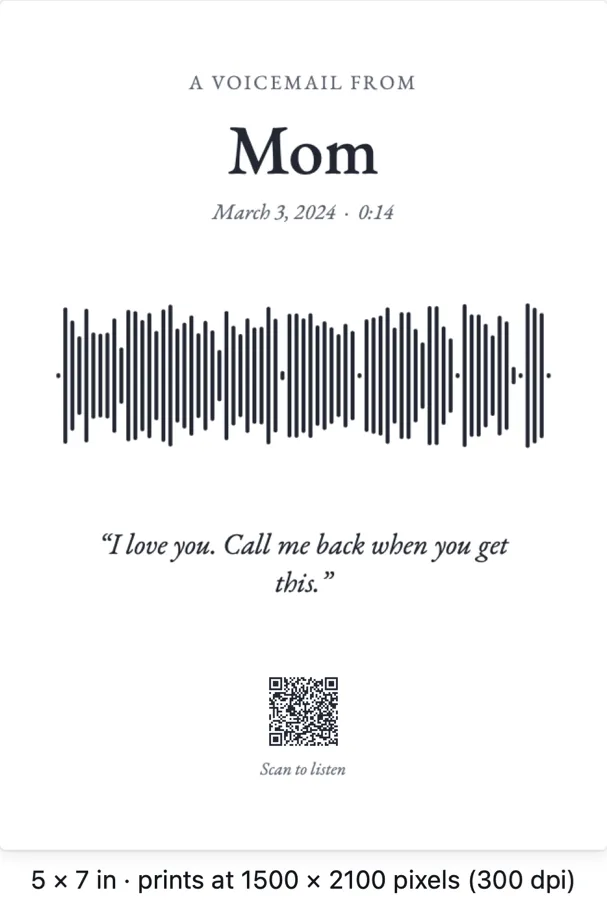
The on-screen preview, which is the thing to scan before printing. The code in our tests reads back the exact link pasted in.
How do you keep the code working?
- Don’t move or rename the file in its folder, and don’t turn off sharing.
- Keep the account. If the code points to an account that’s closed for good, it stops working.
- Keep the MP3 and WAV yourself as well (how), so the print is never the only way back to the voice.
Questions people ask
Can a QR code hold the voicemail itself?
No. The largest QR code holds under 3 KB, in practice a link; our 16-second test voicemail is 25 KB even in a phone's compact AMR format. The code points to a copy of the recording kept online, which is why the link and its sharing setting matter.
Which is best for hosting it, Google Drive, iCloud Drive or Dropbox?
Whichever you already use and will keep. All three can share a file with anyone who has the link. What matters most is that the account stays open and the file isn't moved: Apple warns that moving a shared file breaks its link.
Do people need an account to play it?
With 'anyone with the link' sharing, Google Drive and iCloud links open for anyone; Dropbox says anyone with the link can preview the file. Test it on a phone that isn't signed in to your account before printing.
Does VoicemailKeepsake host the recording?
No, on purpose. The tool runs on your device and never receives your recording, so it can't host it either. You choose where it lives, and you can take it down any time.
Is VoicemailKeepsake free?
Yes, while we launch: the print with its QR code, as a PDF and a picture, costs nothing and needs no sign-up. Later, saving the print files will be part of Pro, $12 once.
Related
- Sound wave printTurn a voicemail into a sound wave print with the name, the date, the words and a QR code. 300 dpi PDF or picture in 5 sizes, made on your device.
- Voicemail to MP3Turn a voicemail from an iPhone or Android into MP3 and WAV files that play anywhere. Trim it, make it louder, keep the name and date in the file.
- When someone has diedKeep a loved one's voicemail before it's lost: what to do before the phone line is canceled, how to save it as a file, and how to keep it for good.
- All guidesEvery VoicemailKeepsake guide, by task.