Save a voicemail as an MP3 file
Turn a voicemail into an MP3 and a WAV
Choose the voicemail you want to keep
M4A, AMR, 3GP, MP3 or WAV, from any phone. Or drop it here.
No file yet? or read how to get the file off your phone.
1 Listen and trim
2 Save the recording
Keep both: the WAV is the sound exactly as it came off the phone, and the MP3 is smaller and plays on every phone, computer and car.
Saving the files is part of Pro. Your voicemail stays open here as you left it, and unlocks as soon as you've paid.
Pro is coming soon · $12 to keep it forever
- Save the recording as MP3 and WAV (and M4A where the browser can make it), trimmed as you like
- Save the words as a text file, also stored inside the MP3
- Save the keepsake print as a 300 dpi PDF and picture, in five sizes
- Everything in one ZIP, with a note saying what each file is
Everything here is free while we launch. Leave your email and we'll write once, when Pro is ready.
3 The words (optional)
A small speech model writes out what was said, on this device, in English. It downloads about 30 MB the first time (Wi-Fi is best) and is quickest on a computer or a recent phone. It gets some words wrong: read along while you listen. Or type the words yourself.
4 The keepsake print
That's more words than fit on this size, so the print ends with “…”. Shorten them, or pick a bigger size.
Add a QR code that plays the recording
We don't keep your recording anywhere, so the code needs a link to a copy you put online: save the MP3, upload it to your Google Drive, iCloud Drive or Dropbox, share it as "anyone with the link", and paste that link here. Then scan the preview with your phone before you print. How to make the link.
That doesn't look like a web link. It should start with https://
300 dpi, the exact size you picked: print it at home on card stock, or take the picture to a photo counter.
The MP3, the WAV, the words and the print together, with a note saying what each file is. Keep a copy in two places.
Runs in your browser. The recording never leaves your device. No sign-up.
Free to listen and preview · Pro ($12) coming soon: the keepsake files · pricing
Choose the voicemail file your phone saved (M4A, AMR, 3GP, MP3 or WAV), trim it if you like, and tap Save MP3, then Save WAV. The MP3 plays on any phone, computer or car; the WAV is the recording sample for sample. Our 16-second test voicemail came out as a 191 KB MP3 and a 253 KB WAV, made on the device in a tenth of a second.
On this page (6)
A voicemail on a phone is not really a file you own. It sits in the Phone app or in the carrier’s mailbox, in a speech format most computers won’t play, until a new phone, a new SIM card or a canceled line takes it away. Making an MP3 and a WAV turns it into ordinary files you can copy anywhere.
What file does your phone give you?
What you have depends on where the voicemail came from. The tool reads the first bytes of the file, not its name, so a file with the wrong ending still opens.
| Where it came from | What you usually get | Opens here |
|---|---|---|
| iPhone: Phone app › Share › Save to Files | an audio file (Apple doesn’t name the format) | Yes |
| Android visual voicemail apps (Samsung, carriers) | often AMR or 3GP (the apps’ pages don’t say) | Yes, AMR is decoded on the device |
| Google Phone app › Send to | an audio file the app chooses | Yes, if it’s one of these formats |
| Google Fi download | MP3 (Google’s help page says so) | Yes |
| A recording made with a second phone | M4A (Voice Memos) or similar | Yes |
How to get the file in the first place: on an iPhone, on Android, and from Verizon, AT&T or T-Mobile voicemail.
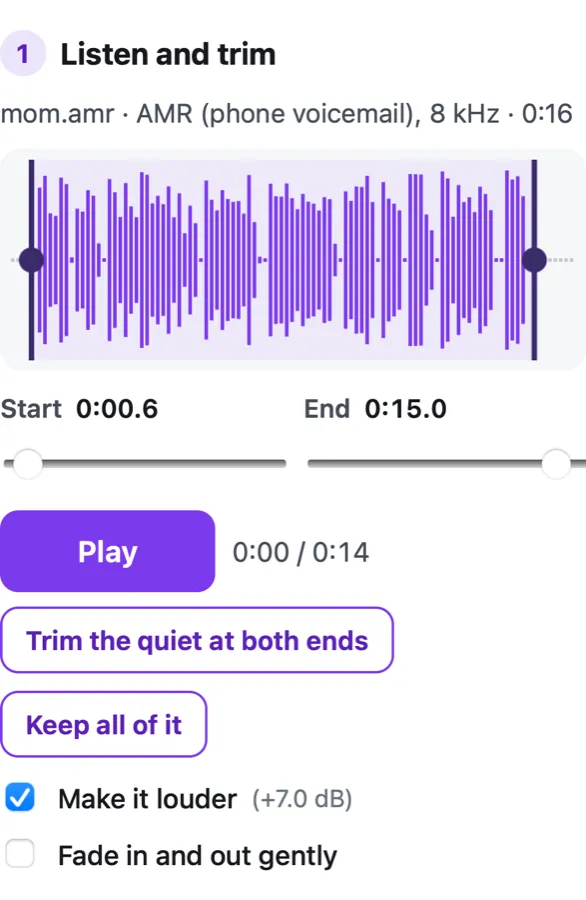
The 16-second test voicemail (a made-up message in a computer voice) opened on an iPhone 15-sized screen, with the quiet at both ends trimmed.
Why keep both an MP3 and a WAV?
They do different jobs:
- The WAV is the recording exactly as it came out of the phone’s format, sample for sample, at the file’s own rate (8,000 samples a second for a carrier voicemail). It never loses anything when copied, so it’s the one to keep safe, untouched.
- The MP3 is about three-quarters the size of the WAV for a voicemail and plays everywhere: phones, computers, car stereos, a funeral home’s slideshow. It’s the one to share.
If your browser can make it (our tests: Chrome on a Mac and Safari’s engine), an M4A (AAC) button appears too.
How big are the files?
Measured with our 16.2-second test voicemail (an AMR file of 25.3 KB, phone-line quality), in Chrome 159 and in WebKit 27.2 (Safari’s engine) on an Apple M4 Mac, November 23, 2026:
| File | Size | Made in |
|---|---|---|
| WAV, 8 kHz, 16-bit mono | 253 KB | under 0.02 s |
| MP3, 96 kbit/s, 44.1 kHz mono | 191 KB | 0.10 s (Chrome), 0.13 s (WebKit) |
| M4A (AAC) | 187 KB (Chrome), 132 KB (WebKit) | 0.05 s |
Per minute that is about 960 KB of WAV and 720 KB of MP3, so even a three-minute message (Verizon’s limit for one basic voicemail) stays under 3 MB. Opening the file took 0.03 to 0.07 seconds in both browsers.
What can you change before saving?
- Trim: drag the two markers on the wave, use the Start and End sliders, or tap Trim the quiet at both ends, which finds where the voice starts and stops and keeps a quarter of a second either side.
- Make it louder: raises the whole recording so its loudest moment sits just under full volume (-1 dB). It doesn’t change the voice, and it never makes it quieter. The tool shows how much it adds, for example +7.0 dB.
- Fade in and out gently: half a second each way, for a recording that starts or ends mid-word.
Nothing changes the original file on your phone. Cut edges always get a 10-millisecond ramp, so a trimmed copy doesn’t click.
What’s inside the MP3?
Besides the sound, the MP3 carries tags that most players show: the title (“Voicemail from Mom”), the name as the artist, the date of the message, and the words, if you wrote them out, in the lyrics tag. The WAV carries the title, date and words in its own info block. Years from now, a file that turns up alone in a folder still says who it’s from.
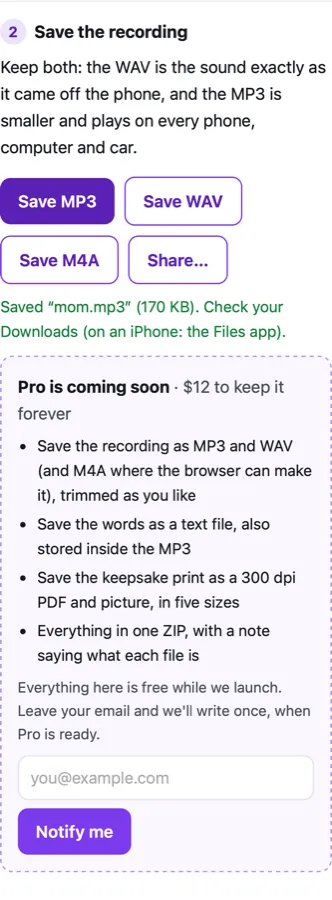
Saving on an iPhone 15-sized screen. On an iPhone, Safari puts downloads in the Files app, usually in Browse › iCloud Drive › Downloads (Settings › Apps › Safari › Downloads changes where).
Where should the files go?
Into at least two places that don’t depend on the phone: a computer and a cloud drive, or a cloud drive and a USB stick in a drawer. Send a copy to a brother, a sister or a cousin as well; that’s a third place, and families tend to want it. The Save everything button at the end of the tool makes one ZIP with the MP3, the WAV, the words, the print and a short note saying what each file is, which is the easiest thing to hand on.
Questions people ask
How do I convert a voicemail to MP3 on my iPhone without an app?
Save the voicemail to Files first (Phone app › the voicemail › Share button › Save to Files), then open this page in Safari, tap Choose the voicemail file, pick it from Files and tap Save MP3. Safari puts the MP3 in the Files app's Downloads folder.
Does trimming or converting lower the quality?
Trimming only cuts. The WAV copy keeps every sample of the decoded recording; the MP3 at 96 kbit/s is far above what a phone line carries (a carrier voicemail in AMR uses 4.75 to 12.2 kbit/s), so you won't hear a difference.
Why is the MP3 bigger than the voicemail file?
Phones store voicemail in speech formats built to be tiny (our 16-second AMR test file is 25 KB). MP3 is made for every kind of sound, so it needs more room for the same voice: 191 KB for those 16 seconds, about 720 KB a minute.
Will the name and date stay with the file?
Yes, if you type them in the print section before saving. They go into the file name (Mom voicemail 2024-03-03.mp3) and into the MP3's tags (title, artist, date), and the words you keep go into its lyrics tag, which most music apps can show.
Is VoicemailKeepsake free?
Yes, while we launch: saving the MP3 and WAV works without paying or signing up. Later, the saved files will be part of Pro at $12, one payment; listening and trimming stay free.
Related
- AMR to MP3Convert an AMR or 3GP voicemail file to MP3 and WAV on your phone or computer. Decoded on your device, nothing uploaded. AMR-NB and AMR-WB.
- Save a voicemail on iPhoneSave a voicemail from the iPhone Phone app as an audio file with the Share button, in the Unified and Classic layouts, then keep it as MP3 and WAV.
- Save a voicemail on AndroidSave a voicemail from an Android phone as an audio file: Google's Phone app, Samsung and carrier voicemail apps, and what to do with no button.
- Voicemail to textWrite out the words of a voicemail without sending it anywhere. A small speech model runs in your browser; check each word, then save or print it.
- All VoicemailKeepsake toolsSave a loved one's voicemail forever: the audio, a transcript and a keepsake print