Convert an AMR file to MP3
Turn a voicemail into an MP3 and a WAV
Choose the voicemail you want to keep
From Android: the AMR, 3GP or MP3 file your voicemail app saved or sent. Or drop it here.
No file yet? or read how to get the file off your phone.
1 Listen and trim
2 Save the recording
Keep both: the WAV is the sound exactly as it came off the phone, and the MP3 is smaller and plays on every phone, computer and car.
Saving the files is part of Pro. Your voicemail stays open here as you left it, and unlocks as soon as you've paid.
Pro is coming soon · $12 to keep it forever
- Save the recording as MP3 and WAV (and M4A where the browser can make it), trimmed as you like
- Save the words as a text file, also stored inside the MP3
- Save the keepsake print as a 300 dpi PDF and picture, in five sizes
- Everything in one ZIP, with a note saying what each file is
Everything here is free while we launch. Leave your email and we'll write once, when Pro is ready.
3 The words (optional)
A small speech model writes out what was said, on this device, in English. It downloads about 30 MB the first time (Wi-Fi is best) and is quickest on a computer or a recent phone. It gets some words wrong: read along while you listen. Or type the words yourself.
4 The keepsake print
That's more words than fit on this size, so the print ends with “…”. Shorten them, or pick a bigger size.
Add a QR code that plays the recording
We don't keep your recording anywhere, so the code needs a link to a copy you put online: save the MP3, upload it to your Google Drive, iCloud Drive or Dropbox, share it as "anyone with the link", and paste that link here. Then scan the preview with your phone before you print. How to make the link.
That doesn't look like a web link. It should start with https://
300 dpi, the exact size you picked: print it at home on card stock, or take the picture to a photo counter.
The MP3, the WAV, the words and the print together, with a note saying what each file is. Keep a copy in two places.
Runs in your browser. The recording never leaves your device. No sign-up.
Free to listen and preview · Pro ($12) coming soon: the keepsake files · pricing
AMR is the speech format phone networks and voicemail apps use, and no web browser plays it. Choose the .amr (or .3gp) file above: the tool decodes it on your device with opencore-amr compiled to WebAssembly, then tap Save MP3 or Save WAV. Our 25 KB, 16-second AMR test voicemail opened in under 0.1 s and became a 191 KB MP3. Nothing is uploaded.
On this page (5)
If someone sent you a voicemail from an Android phone, or you archived one from a visual voicemail app, there’s a good chance it ended in .amr or .3gp and refuses to play. That’s not a broken file. It’s a format made for phone networks, not for computers.
What is AMR, exactly?
Adaptive Multi-Rate is the codec mobile networks use to carry speech, and its file format is defined in RFC 4867 (April 2007). The facts that matter when you convert one:
- AMR (narrowband) samples sound 8,000 times a second, in 20-millisecond frames, at one of eight rates from 4.75 to 12.2 kbit/s. That’s phone-line quality: the voice is all there, the treble isn’t.
- AMR-WB (“HD voice”) samples 16,000 times a second at nine rates from 6.6 to 23.85 kbit/s.
- An AMR file starts with the six characters
#!AMRand a line break (#!AMR-WBfor wideband). That’s how the tool recognizes one even when the file name has lost its ending.
A minute of the best-quality narrowband AMR is 96 KB (32 bytes every 20 milliseconds). Converting it can’t add detail that isn’t there, but it can stop the detail that is there from being lost to a format nothing plays.
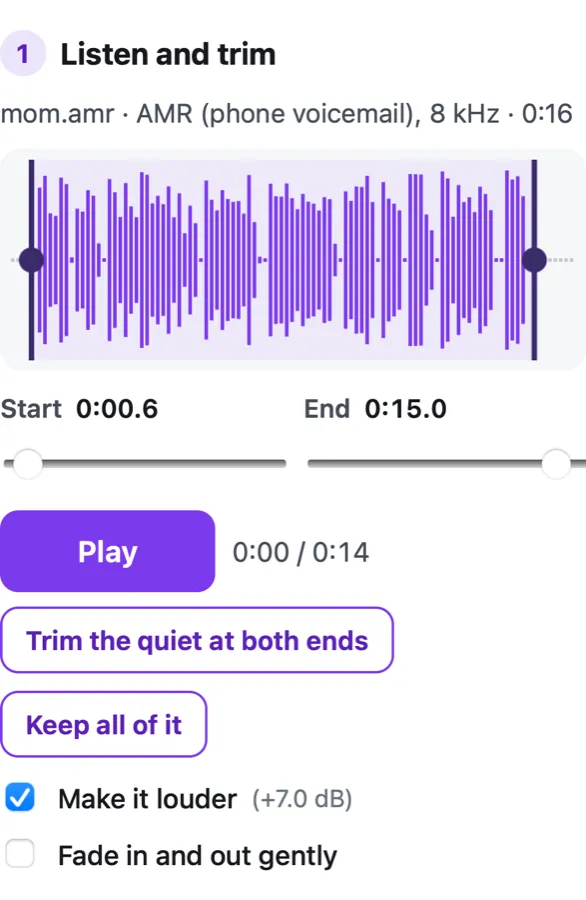
Our AMR test file in the tool on an iPhone 15-sized screen. The line under the heading says what the file holds.
How do you convert AMR to MP3 here?
- Choose the file with the button at the top. On a phone, pick it from Files (iPhone) or My Files / Files (Android); on a computer you can drop it on the box.
- Listen. If it plays, the decode worked. Trim the start and end if you like.
- Save MP3 (smaller, plays everywhere) and Save WAV (the decoded sound, sample for sample, at 8 kHz for narrowband or 16 kHz for wideband).
The WAV is the closest thing to the original you can keep in a common format: AMR is decoded once, and nothing is compressed again. The MP3 is made at 96 kbit/s, several times the AMR’s own rate.
Where do AMR voicemail files come from?
Carriers’ help pages describe where their apps put saved messages, though not always the format:
- AT&T, Samsung Galaxy: in the Visual Voicemail app, touch and hold a message and tap Archive; AT&T says archiving “will clear it from your voice mailbox and save the file locally to your phone,” in My Files › Internal Storage › VisualVoicemail. Details: saving AT&T voicemail.
- T-Mobile Visual Voicemail (Android): select and hold a message, then Save message to, which T-Mobile says copies it “to the memory card.” See T-Mobile voicemail.
- Google’s Phone app: expand the voicemail and tap Send to. More in saving a voicemail on Android.
Whatever ending the file has (.amr, .3gp, .3gpp, .awb, or none), choose it here: the tool checks what’s inside.
What happens to a 3GP file?
A 3GP file is a box with sound inside, laid out like an MP4. The tool reads the box, finds the sound track and checks its format. If it’s AMR, it copies the frames out (they’re stored the same way as in an .amr file) and decodes them; if it’s AAC, it hands it to the browser’s own decoder. Our 3GP test file with AMR inside opened in 0.03 seconds in Chrome and 0.04 seconds in WebKit (Safari’s engine); the one with AAC inside opens the same way in both.
What if it still won’t open?
The tool tells you why in plain words. The usual reasons:
- The file is empty (0 bytes), often a message that hadn’t finished downloading to the phone. Save it again.
- It isn’t sound at all, for example a web page or a text file saved by mistake from a share menu.
- It’s a format this browser can’t decode (rare for voicemail). Try Chrome or Safari, or record it with a second phone as a last resort.
Questions people ask
What is an AMR file?
A recording in Adaptive Multi-Rate, the speech format built for mobile phone networks. RFC 4867, which defines the file format, says AMR samples sound 8,000 times a second at 4.75 to 12.2 kbit/s, and the wideband version (AMR-WB) 16,000 times a second at 6.6 to 23.85 kbit/s. Voicemail apps on Android often save messages in it.
Why won't my AMR file play?
Most web browsers and many media players don't include an AMR decoder. The file is usually fine; it just needs converting. This page carries its own decoder, so the file opens here even in browsers that can't play it.
What's the difference between AMR and 3GP?
AMR is the sound format; 3GP is a container file that can hold AMR sound (or AAC). The tool looks inside a 3GP file, takes the AMR frames out and decodes them, so both kinds open.
Can I convert several AMR files at once?
Not yet: one file at a time, so you can listen, trim and name each one. Each takes a few seconds by hand.
Is the AMR to MP3 converter free?
Yes, while we launch, with no sign-up. Later, saving the converted files will be part of Pro, $12 once; opening, playing and trimming stay free.
Related
- Voicemail to MP3Turn a voicemail from an iPhone or Android into MP3 and WAV files that play anywhere. Trim it, make it louder, keep the name and date in the file.
- Save a voicemail on AndroidSave a voicemail from an Android phone as an audio file: Google's Phone app, Samsung and carrier voicemail apps, and what to do with no button.
- AT&T voicemailAT&T keeps basic voicemail 14 days and visual voicemail 30. How to save AT&T voicemails as files on iPhone and Samsung, and where archived ones go.
- All VoicemailKeepsake toolsSave a loved one's voicemail forever: the audio, a transcript and a keepsake print