Transcribe a voicemail to text
Write out the words of a voicemail
Choose the voicemail you want to keep
M4A, AMR, 3GP, MP3 or WAV, from any phone. Or drop it here.
No file yet? or read how to get the file off your phone.
1 Listen and trim
2 Save the recording
Keep both: the WAV is the sound exactly as it came off the phone, and the MP3 is smaller and plays on every phone, computer and car.
Saving the files is part of Pro. Your voicemail stays open here as you left it, and unlocks as soon as you've paid.
Pro is coming soon · $12 to keep it forever
- Save the recording as MP3 and WAV (and M4A where the browser can make it), trimmed as you like
- Save the words as a text file, also stored inside the MP3
- Save the keepsake print as a 300 dpi PDF and picture, in five sizes
- Everything in one ZIP, with a note saying what each file is
Everything here is free while we launch. Leave your email and we'll write once, when Pro is ready.
3 The words (optional)
A small speech model writes out what was said, on this device, in English. It downloads about 30 MB the first time (Wi-Fi is best) and is quickest on a computer or a recent phone. It gets some words wrong: read along while you listen. Or type the words yourself.
4 The keepsake print
That's more words than fit on this size, so the print ends with “…”. Shorten them, or pick a bigger size.
Add a QR code that plays the recording
We don't keep your recording anywhere, so the code needs a link to a copy you put online: save the MP3, upload it to your Google Drive, iCloud Drive or Dropbox, share it as "anyone with the link", and paste that link here. Then scan the preview with your phone before you print. How to make the link.
That doesn't look like a web link. It should start with https://
300 dpi, the exact size you picked: print it at home on card stock, or take the picture to a photo counter.
The MP3, the WAV, the words and the print together, with a note saying what each file is. Keep a copy in two places.
Runs in your browser. The recording never leaves your device. No sign-up.
Free to listen and preview · Pro ($12) coming soon: the keepsake files · pricing
Open the voicemail file above and tap Write out the words. A small speech model (OpenAI's Whisper tiny, English) runs inside your browser, so the recording never leaves your device; it downloads about 30 MB the first time. On our two made-up test voicemails it got 71 of 80 words right, in 1.2 to 1.4 seconds per message on an Apple M4 Mac. Correct it while you listen, then save it or put it on a print.
On this page (5)
A transcript does two things for a voicemail you want to keep. It makes the message findable and readable when you can’t play it out loud, and it gives you the words, exactly, for a card, a frame or a eulogy. Most transcription services do it on their servers. This one does it on your device.
How does it work?
The tool hands the part of the recording you kept to a small speech model running inside the page, in a background thread so the page stays responsive:
- The sound is made louder (so the loudest moment is just under full volume) and converted to 16,000 samples a second, which is what the model listens at.
- The model, Whisper tiny.en (OpenAI’s speech recognizer, the 39-million-parameter English-only size, in an 8-bit copy), runs in WebAssembly. The first time, the browser downloads it from our engine server: about 30 MB, gzipped. After that it’s kept by the browser, so the next transcript starts at once.
- The words appear in the box under the button. They’re yours to change.
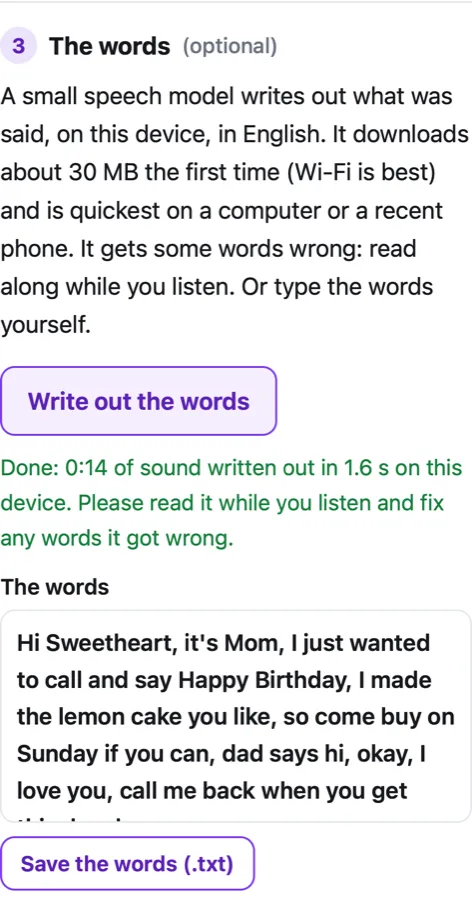
The test voicemail written out in WebKit (Safari’s engine) at iPhone 15 size. “Come by” became “come buy”; that’s the kind of slip to fix by ear.
How accurate is it?
We made two test voicemails with computer voices, cut them down to phone-line quality (300 to 3,400 Hz, 8 kHz, a little line hiss), saved them as AMR like a carrier would, and counted the words the tool got right. Same result in Chrome 159 and in WebKit 27.2 on an Apple M4 Mac, November 23, 2026:
| Test message | Words | Right | Time to write out |
|---|---|---|---|
| “Hi sweetheart, it’s Mom…” (clear female voice, 16 s) | 44 | 42 | 1.3 to 1.4 s |
| “Hey kiddo, it’s Grandpa…” (low male voice, 17 s) | 36 | 29 | 1.2 to 1.3 s |
What it got wrong is typical: names and pet names (“kiddo” came out as “Kittle”), a few short words run together (“won tonight” became “London night”), and repeated filler. Real voicemails vary far more than our tests, so treat these numbers as a best case and listen through once while you read.
Is it too heavy for a phone?
Honestly, it’s the heaviest part of the tool, so it’s optional and only starts when you tap the button. The 30 MB download is fine on Wi-Fi and slow on a weak signal. It also needs memory while it runs: recent phones have plenty, older ones may run short. We measured speed on a computer, not on phones yet, so the tool shows you its own timing (“written out in 4.2 s on this device”), and if it fails it says so and leaves everything else working. Typing the words yourself is always there, and for a 30-second message it takes a couple of minutes.
Can my phone or carrier transcribe voicemail already?
Often, yes, and it’s worth looking at before you rely on any one source. What the makers’ help pages say (read November 23, 2026):
- iPhone: Apple says “Voicemail transcription is available from select carriers in select countries or regions”; the transcript appears in the bottom half of the screen when you open the message. (Apple)
- Google’s Phone app (Android): transcription is “only available in English and Spanish on Android 8.0 and up,” and turning transcription off deletes the recordings and transcripts from the app. (Google)
- Verizon: Premium Visual Voicemail (Android) and Voicemail to Text for iPhone are $2.99 per line a month and “transcribe the first 45 seconds of your voicemails.” (Verizon)
- AT&T: its voicemail-to-text “is provided without a monthly recurring charge,” and AT&T’s terms say the audio file is “transmitted to the transcription platform.” (AT&T)
- T-Mobile: “Only the Primary Account Holder may subscribe to Voicemail to Text. Prepaid accounts excluded.” (T-Mobile)
A transcript that already exists on the phone is a good starting point: copy it into the words box here and correct it against the recording.
What can you do with the words?
- Save them as a text file with the name, date and length on top (Save the words).
- Keep them inside the recording: when you save the MP3, the words go into its lyrics tag, and into the WAV’s info block.
- Print them: the keepsake print fills in the words from this box until you change them there, so you can print all of them or one line. See the sound wave print.
- Read them at a service. If the voicemail is from someone who has died, our guide covers what to save first.
Questions people ask
How accurate is the transcript?
On our two test voicemails (made-up messages in computer voices, cut down to phone-line quality) it got 71 of 80 words right: 42 of 44 on a clear message, 29 of 36 on a deeper, mumbled one. Real messages with wind, traffic or a soft voice will have more mistakes, so read it while you listen.
Is my voicemail uploaded to transcribe it?
No. The model is downloaded to your browser and runs there; the sound is handed to it inside the page and only the text comes back. The first time, the download is about 30 MB; after that the browser keeps it.
Does it work on a phone?
It's built to, but phones are slower and have less memory than the Mac we measured on, and we haven't timed it on real phones yet. The tool tells you how long it took on your device. If it fails or takes too long, type the words yourself; everything else works without it.
Which languages does it understand?
English only for now. The model we use is Whisper tiny.en, an English-only model; a voicemail in another language will come out wrong. You can always type the words in any language, and they print fine.
Is VoicemailKeepsake free?
Yes, while we launch: writing out the words, correcting them and saving them work without paying or signing up. Later, saving the text file will be part of Pro, $12 once; writing out and reading the words on screen stays free.
Related
- Sound wave printTurn a voicemail into a sound wave print with the name, the date, the words and a QR code. 300 dpi PDF or picture in 5 sizes, made on your device.
- Voicemail to MP3Turn a voicemail from an iPhone or Android into MP3 and WAV files that play anywhere. Trim it, make it louder, keep the name and date in the file.
- When someone has diedKeep a loved one's voicemail before it's lost: what to do before the phone line is canceled, how to save it as a file, and how to keep it for good.
- All VoicemailKeepsake toolsSave a loved one's voicemail forever: the audio, a transcript and a keepsake print