Make sound wave art from a voicemail
Make a sound wave print from a voicemail
Choose the voicemail you want to keep
M4A, AMR, 3GP, MP3 or WAV, from any phone. Or drop it here.
No file yet? or read how to get the file off your phone.
1 Listen and trim
2 Save the recording
Keep both: the WAV is the sound exactly as it came off the phone, and the MP3 is smaller and plays on every phone, computer and car.
Saving the files is part of Pro. Your voicemail stays open here as you left it, and unlocks as soon as you've paid.
Pro is coming soon · $12 to keep it forever
- Save the recording as MP3 and WAV (and M4A where the browser can make it), trimmed as you like
- Save the words as a text file, also stored inside the MP3
- Save the keepsake print as a 300 dpi PDF and picture, in five sizes
- Everything in one ZIP, with a note saying what each file is
Everything here is free while we launch. Leave your email and we'll write once, when Pro is ready.
3 The words (optional)
A small speech model writes out what was said, on this device, in English. It downloads about 30 MB the first time (Wi-Fi is best) and is quickest on a computer or a recent phone. It gets some words wrong: read along while you listen. Or type the words yourself.
4 The keepsake print
That's more words than fit on this size, so the print ends with “…”. Shorten them, or pick a bigger size.
Add a QR code that plays the recording
We don't keep your recording anywhere, so the code needs a link to a copy you put online: save the MP3, upload it to your Google Drive, iCloud Drive or Dropbox, share it as "anyone with the link", and paste that link here. Then scan the preview with your phone before you print. How to make the link.
That doesn't look like a web link. It should start with https://
300 dpi, the exact size you picked: print it at home on card stock, or take the picture to a photo counter.
The MP3, the WAV, the words and the print together, with a note saying what each file is. Keep a copy in two places.
Runs in your browser. The recording never leaves your device. No sign-up.
Free to listen and preview · Pro ($12) coming soon: the keepsake files · pricing
Open the voicemail above, trim it to the part you love, then type the name and the date and choose the words. The print updates as you type; save it as a 300 dpi PDF or PNG at 4 × 6, 5 × 7 or 8 × 10 inches, Letter or A4. Add a QR code if you've put the recording somewhere online. The 5 × 7 PDF of our test message is 81 KB and took 0.14 s to make.
On this page (5)
A sound wave print is the shape of someone’s voice, drawn from the actual recording: the loud words tall, the pauses flat. With their name above it and their words below, it’s something you can hold and frame. Shops make these to order; this page makes it from your file, on your device, in a minute.
What goes on the print?
Everything is optional except the wave:
- A line above the name, “A voicemail from” unless you change it.
- The name, as you called them: Mom, Grandpa Joe, Abuela.
- The date of the message and, if you like, how long it is.
- The sound wave of the part you kept, as bars or as one continuous line.
- The words, in quotes. They fill in from the transcript until you change them, so you can keep a single line: “Call me back when you get this.”
- A QR code that opens the recording, with a short line under it (“Scan to listen”).
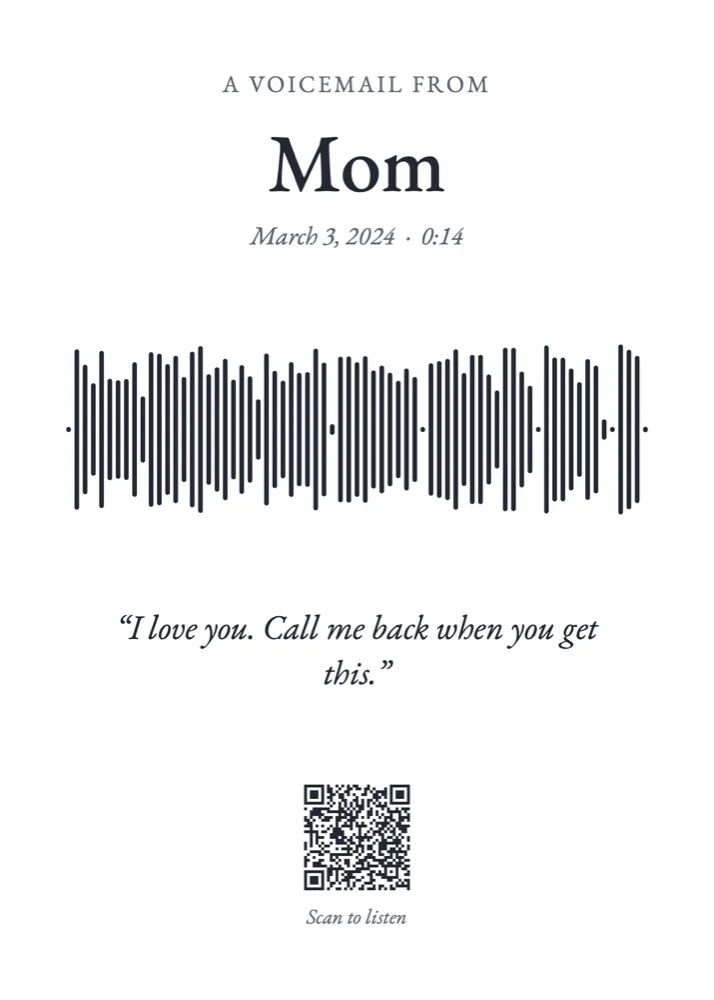
The actual 5 × 7 PNG the tool made from our test voicemail (a made-up message in a computer voice), scaled down for this page.
Which sizes and styles are there?
| Size | Pixels at 300 dpi | PNG | |
|---|---|---|---|
| 4 × 6 in (photo print) | 1200 × 1800 | 117 to 136 KB | 64 to 65 KB |
| 5 × 7 in (frame) | 1500 × 2100 | 155 to 178 KB | 81 to 84 KB |
| 8 × 10 in (frame) | 2400 × 3000 | 288 to 333 KB | 152 KB |
| Letter (8.5 × 11 in) | 2550 × 3300 | 320 to 370 KB | 164 to 166 KB |
| A4 (210 × 297 mm) | 2480 × 3508 | 320 to 367 KB | 157 to 159 KB |
Sizes are from our test message with a name and a sentence of words, in Chrome 159 and WebKit 27.2 (the two numbers are the two browsers). Each PDF took 0.11 to 0.34 seconds to make. Every size can be tall or wide, in ink, navy, rose, sage or plum, on white or cream.
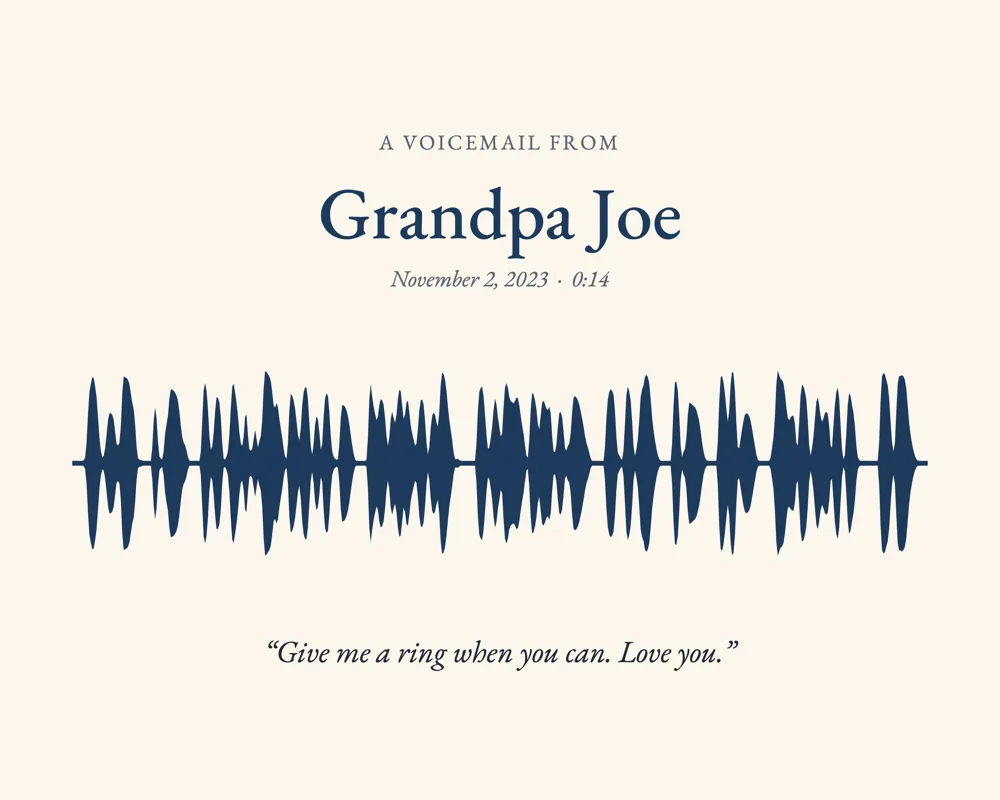
The same tool, wide 8 × 10 in, line wave, navy on cream.
How do you add a QR code that plays it?
The code is just a web link printed as a square, so it needs somewhere for the recording to live. We deliberately don’t keep recordings, so that somewhere is yours:
- Save the MP3 with the tool.
- Upload it to a cloud drive you already use and share it so that anyone with the link can open it. Google Drive, iCloud Drive and Dropbox all do this; the scheduled guide how to make a QR code that plays a voicemail has each one’s steps from its own help pages.
- Paste the link into “Link to the recording” under the print. Links have to start with https://; the tool warns you if one doesn’t.
- Scan the preview on your screen with your phone’s camera before you print. If it opens the recording, the print will too.
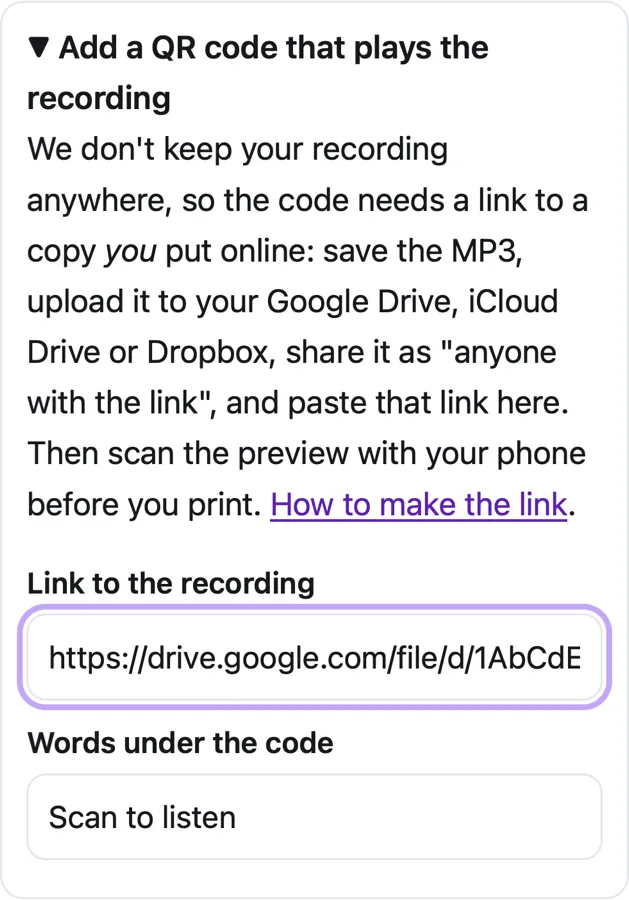
The code is drawn at least 0.8 inch wide on the print, with a white border around it. We check it in our automated tests by reading the code back from the saved picture.
How do you print it well?
- At home: open the PDF and print at 100% / actual size, not “fit to page”, on matte photo paper or heavy card stock. Letter and A4 PDFs are made for that.
- At a photo counter or online photo service: upload the PNG and choose the same size you made (4 × 6, 5 × 7 or 8 × 10). It’s already 300 dots per inch, and the file says so.
- For a frame: a 5 × 7 print in an 8 × 10 frame with a mat leaves a calm border; an 8 × 10 fills the frame.
Is it different from ordering one from a shop?
A shop gives you a finished, often framed object and a designer’s eye, and that’s worth paying for. Making it here gives you control and privacy: the recording stays on your device instead of going to a stranger by email, you see the print before you commit, and you can make as many sizes and versions as the family wants. Some people do both: make it here to choose the words and the part of the message, then take the picture to a print shop.
Questions people ask
What size should I print it?
For a frame, 5 × 7 or 8 × 10 inches; both are standard frame sizes. For a card or a small frame, 4 × 6. Letter and A4 suit a home printer. Each one is drawn for its own shape, so pick the size first and then check the words still fit.
How does the QR code play the voicemail?
It's a link. We don't keep your recording, so you put a copy somewhere online (your Google Drive, iCloud Drive or Dropbox), share it so anyone with the link can open it, and paste that link in. Scan the preview with your phone before printing to check it opens.
Will the QR code still work in ten years?
Only as long as the link does. If the file is moved, deleted or its sharing is turned off, the code stops working. Keep the file where it is, and keep the MP3 too, so the print never depends on the link alone.
Can I print it at a photo counter?
Yes. Save it as a picture (PNG); it's exactly the size you chose at 300 dots per inch, the usual resolution for photo prints. Upload it the way you would a photo and choose the same size.
Is VoicemailKeepsake free?
Yes, while we launch: the print, the PDF and the picture work without paying or signing up. Later, saving the print files will be part of Pro, $12 once, together with the audio and the words; the preview on screen stays free.
Related
- Voicemail to textWrite out the words of a voicemail without sending it anywhere. A small speech model runs in your browser; check each word, then save or print it.
- Voicemail to MP3Turn a voicemail from an iPhone or Android into MP3 and WAV files that play anywhere. Trim it, make it louder, keep the name and date in the file.
- When someone has diedKeep a loved one's voicemail before it's lost: what to do before the phone line is canceled, how to save it as a file, and how to keep it for good.
- All VoicemailKeepsake toolsSave a loved one's voicemail forever: the audio, a transcript and a keepsake print