How to record a voicemail you can't export
If there's no Save or Share button (basic, dial-in voicemail, an old flip phone, a phone you can only listen on), record the message as it plays. On an iPhone where Apple offers call recording (not in the EU), call your mailbox and use the Phone app's Call Recording, then save the audio from Notes. Otherwise play it on speaker in a quiet room and record it with a second phone's Voice Memos, Recorder or Voice Recorder app, a few inches away. Then trim and keep it here.
On this page (5)
Some voicemails can’t be saved as files at all. Basic voicemail, the kind you reach by calling your mailbox and pressing keys, has no Save button on any of the three big US carriers’ help pages. That doesn’t mean the voice is lost. It means you record it, the same way you’d record anything else, and keep the recording.
Which method should you use?
| Situation | Best method |
|---|---|
| An iPhone, in a country where Apple’s call recording works | Call the mailbox and use Call Recording (no speaker, no room noise) |
| Any phone that plays the message, plus a second phone | Speaker into a second phone’s recorder app |
| A Verizon basic voicemail you’d rather not record yourself | Verizon’s FAQ names a paid copying service; see our Verizon page |
| T-Mobile, with DIGITS | DIGITS can download voicemails; see our T-Mobile page |
| Someone’s outgoing greeting, not a message | Call the number and record the call; see saving a voicemail greeting |
How do you record it with iPhone call recording?
From Apple’s Record and transcribe a call, checked November 23, 2026:
- “Open the Phone app and make a call”: here, call your own voicemail and enter the PIN.
- “During the call, tap the More button, then tap Call Recording.”
- Play the message from the mailbox menu. To stop, tap the Stop button or hang up.
- The recording is saved “to a Call Recordings folder in the Notes app.” Open the note, tap the recording, tap More, then Save Audio Files.
Apple says “Both call participants hear an audio notice that the call is being recorded,” so the start of your file will have that notice; trim it off below. Apple lists countries where call recording isn’t available, including the European Union, and the guide doesn’t mention calls to voicemail. If the option doesn’t appear, use the second-phone method.
Trim and keep the recording
Choose the voicemail you want to keep
M4A, AMR, 3GP, MP3 or WAV, from any phone. Or drop it here.
No file yet? or read how to get the file off your phone.
1 Listen and trim
2 Save the recording
Keep both: the WAV is the sound exactly as it came off the phone, and the MP3 is smaller and plays on every phone, computer and car.
Saving the files is part of Pro. Your voicemail stays open here as you left it, and unlocks as soon as you've paid.
Pro is coming soon · $12 to keep it forever
- Save the recording as MP3 and WAV (and M4A where the browser can make it), trimmed as you like
- Save the words as a text file, also stored inside the MP3
- Save the keepsake print as a 300 dpi PDF and picture, in five sizes
- Everything in one ZIP, with a note saying what each file is
Everything here is free while we launch. Leave your email and we'll write once, when Pro is ready.
3 The words (optional)
A small speech model writes out what was said, on this device, in English. It downloads about 30 MB the first time (Wi-Fi is best) and is quickest on a computer or a recent phone. It gets some words wrong: read along while you listen. Or type the words yourself.
4 The keepsake print
That's more words than fit on this size, so the print ends with “…”. Shorten them, or pick a bigger size.
Add a QR code that plays the recording
We don't keep your recording anywhere, so the code needs a link to a copy you put online: save the MP3, upload it to your Google Drive, iCloud Drive or Dropbox, share it as "anyone with the link", and paste that link here. Then scan the preview with your phone before you print. How to make the link.
That doesn't look like a web link. It should start with https://
300 dpi, the exact size you picked: print it at home on card stock, or take the picture to a photo counter.
The MP3, the WAV, the words and the print together, with a note saying what each file is. Keep a copy in two places.
Runs in your browser. The recording never leaves your device. No sign-up.
How do you record it on speaker with a second phone?
You need the phone that plays the message, a second phone (or a tablet or laptop) to record, and a quiet room.
Set up:
- Put both phones on a soft surface (a towel or a cushion), so the table doesn’t buzz.
- Turn on Do Not Disturb on both, so a notification doesn’t sound in the middle.
- Turn the playing phone’s volume all the way up, on speaker.
- Put the recording phone’s microphone a few inches from the speaker. Don’t hold either phone.
Record, then start playback, then stop recording a few seconds after the message ends. The extra seconds are easy to trim. Record it twice if you can; keep the better one.
The recording apps, from their makers’ own pages:
- iPhone, Voice Memos (Apple): “Go to the Voice Memos app (in the Utilities folder),” “Tap [the Record button] to begin recording,” and tap the Stop button to finish. To get the file: tap the recording, tap More, tap Share, then Save to Files. Apple says “By default, recordings are exported in .m4a format” (export).
- Pixel, Recorder (Google): “open the Recorder app,” “Tap Record,” and “When you’re done, tap Pause”; Google’s next step reads “To continue recording or stop to save, tap Resume.” To get the file, touch and hold the recording, tap Share › File, choose Audio (share). Recorder works on Pixel 3 and later.
- Samsung, Voice Recorder (Samsung, updated May 14, 2026): “Tap the Record icon to start recording,” “To stop recording, tap the Stop button,” then “Check the file name, then tap Save.” Recordings are in My Files › Internal storage › Recordings › Voice Recorder.
How do you clean up the recording?
Open it in the tool on this page:
- Trim the quiet at both ends finds where the voice starts and stops. Then drag the start marker past the mailbox’s own announcements (“first saved message…”) and the end marker before the menu.
- Make it louder lifts the whole recording so the loudest moment is just under full volume. Recordings made on speaker are often quiet; this fixes that without changing the voice.
- Fade in and out gently hides an abrupt start if the message begins mid-word.
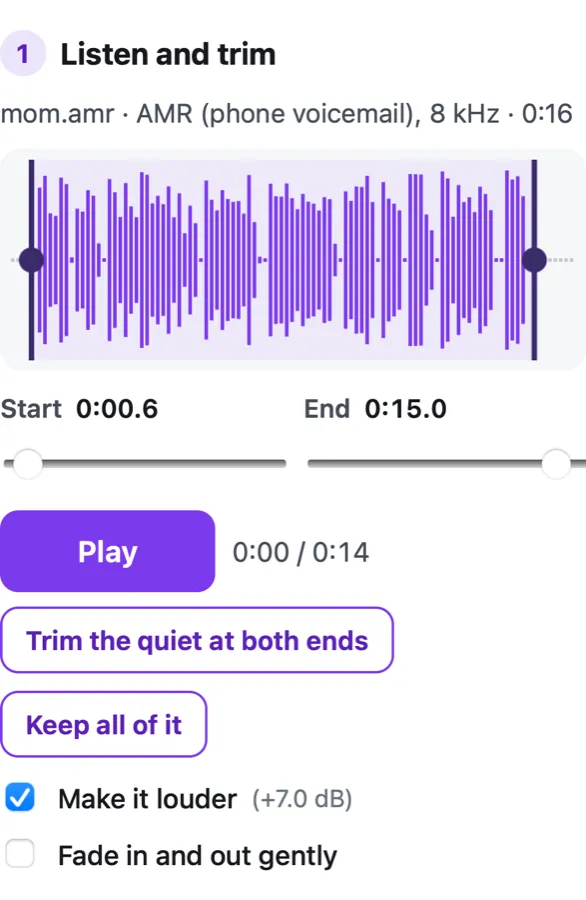
Trimming in the tool, at iPhone 15 size, on a made-up test message: the grey parts at each end are cut, and the volume is lifted by 7 dB.
The tool doesn’t remove background noise or echo. It keeps the sound as it is, which for a keepsake is usually what you want.
Is it worth doing even if it’s not perfect?
Yes. A recording of a recording loses some of the crispness, but the voice, the pauses, the way they said your name all come through. And unlike the message in the mailbox, a file doesn’t expire: AT&T keeps basic voicemail “for a period of 14 days,” and T-Mobile deletes messages after its auto-save period. If the voicemail is from someone who has died, read what to do first, before the line is changed.
Questions people ask
Can I record my voicemail with iPhone call recording?
Apple's guide says you can record a call by tapping More, then Call Recording, during the call; the recording goes to a Call Recordings folder in Notes, where More › Save Audio Files saves it. Apple doesn't mention calls to voicemail, and both sides hear a notice that the call is recorded, so expect to trim that part. It isn't available in the EU and some other countries.
How do I get the best quality recording on speaker?
A quiet room, the playing phone at full volume, the recording phone a few inches from its speaker, both phones on a soft surface and on Do Not Disturb. Record the whole message plus a few seconds either side, then trim it in the tool.
Will a recording sound as good as the original?
Close, not the same: the speaker and the room add a little color and echo. Call recording on an iPhone avoids the speaker and the room. Either way the voice is there, and that's what matters most; the tool's Make it louder evens out the volume.
What format does Voice Memos save?
Apple says recordings exported from Voice Memos are .m4a by default. The tool here opens M4A, as well as the files Android recorder apps make.
Is VoicemailKeepsake free?
Yes, while we launch: opening the recording, trimming it and saving MP3 and WAV copies cost nothing and need no sign-up. Later, saving the files will be part of Pro, $12 once.
Related
- Save a voicemail on AndroidSave a voicemail from an Android phone as an audio file: Google's Phone app, Samsung and carrier voicemail apps, and what to do with no button.
- When someone has diedKeep a loved one's voicemail before it's lost: what to do before the phone line is canceled, how to save it as a file, and how to keep it for good.
- Voicemail to MP3Turn a voicemail from an iPhone or Android into MP3 and WAV files that play anywhere. Trim it, make it louder, keep the name and date in the file.
- All guidesEvery VoicemailKeepsake guide, by task.